In multi-client applications, clients may connect and disconnect at random times. For example, during HIL batch tests that run for extended periods of time, various users may connect to the system several times a day to check on the progress and status of test that are of interest to them.
In order to support this scenario, the server software should be able to dynamically accept and service any number of incoming connections. The server should also keep track of client requests and be able to service each client in an individual way. For example, if the server acquires multiple channels of data, clients should be able to request a channel subset that is managed on a per-connection basis.
The goal of this document is to describe a server design pattern that can run indefinitely, continuously monitoring for new connections and servicing them accordingly.
An installer for the Simple TCP/IP Messaging (STM) component and multi-client server example code can be found at the link you will find at the end of this document. If you are not familiar with the Simple TCP/IP Messaging protocol and the Command-based Communication, design pattern, we recommend that you read about them before continuing with this document.
This document discusses an approach to LabVIEW network communication using the TCP/IP protocol. You may also want to consider using Shared Variables, which provide a higher-level programming interface and abstract most of the implementation details described here.
Example Application
The example application used in this document has the following features: Server- Simulates the acquisition of 4 data channels
- Accepts any number of clients
- Receives commands such as stop and desired channel from the client
- Sends data to each of the connected clients. Each client only receives the data they requested
Client (each client is identical)
- Connects, disconnects and reconnects to the server
- Sends commands such as stop and desired channel
- Receives data from the server and displays it on a graph
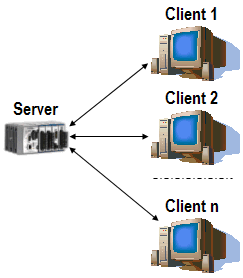
Figure 1. Multi-client Server Overview
Implementation Options
When implementing a server capable of handling multiple connections, there are a couple of approaches you can take.One approach uses singleton servers for each connection. Each time a new connection is established, the server launches a new instance of the singleton routine to service the connection. This approach provides a modular design pattern, but it also provides some limitations that make this design less desirable for Real-Time systems. Launching multiple servers can produce a significant hit in determinism and memory consumption, because each server needs to be instantiated and requires its own context space. Also, the fact that LabVIEW must then switch context between server instances creates an overall performance hit. The modularity benefits can quickly become performance burdens, particularly when implementing servers in lower-end targets such as FieldPoint or CompactRIO.
A more efficient approach uses a "Connection Manager" as the design centerpiece. The idea is to provide a mechanism to store and retrieve client connection information. The server application can simply retrieve client connections from the manager and service them in a loop. The following section describes how to use the connection manager included with the Simple TCP/IP Messaging component.
Connection Manager
The Connection Manager stores client connection parameters and provides the server with an API for accessing that information. The Connection Manager provides for storing application-specific context information on a per-connection basis, so that the server knows the properties and status for each connection that it services.
The Connection Manager programming interface is a VI that provides methods for adding, retrieving and closing connections, as well as setting and getting connection properties.

Figure 2. STM Connection Manager VI
- An array of TCP/IP client connection references
- An array of clusters for storing connection properties
These two arrays are correlated such that when the connection manager adds or deletes a connection reference, it does the same for the connection properties.
For the example application, the connection properties cluster contains the channel that the client wishes to view. The connection properties are defined using the strict typedef cluster stm_ConnectionProperties.ctl. You can redefine the connection properties for your application by modifying this typedef, which is located in a STM typedef subfolder in the LabVIEW user.lib folder. You can open this typedef from the connection manager front panel. You may want to save a copy of the modified typedef so that it does not get overwritten if you reinstall the STM component.
The multi-client server design pattern uses a second VI (Check Connection) to check the status of each connection as it is serviced. If an error occurs, STM Check Connection determines whether it is recoverable. Errors such as timeout are considered warnings, while others, including "connection closed by peer" or "connection loss", indicate that the connection is no longer valid.

Figure 3. STM Check Connection VI

Figure 4. STM Check Connection LabVIEW diagram
Note that STM Check Connection doesn't return an error if the incoming error code is 1, 62, 64 or 66 (these are standard TCP/IP error codes). These codes indicate that the connection has been closed for various reasons, and are expected to occur at some point during the execution. STM Check Connection traps these errors and calls the Connection Manager to closes the connection reference.
The following sections describe how to use the Connection Manager in a Command-based design pattern to create a multi-client server application.

Tidak ada komentar:
Posting Komentar